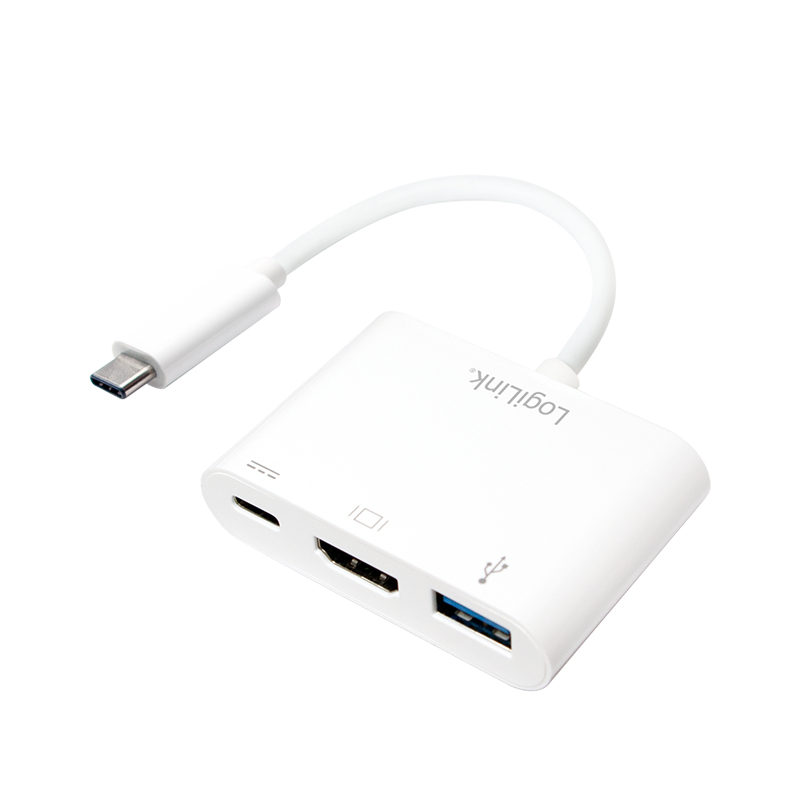
LogiLink USB 3.2 Gen1 Type-C adapter. C/M to HDMI/F+2xUSB. 1080p/60 Hz You can connect the USB-C to HDMI multiport adapter from LogiLink to your MacBook with the USB-C and to an HDMI display via HDMI connection. You can also connect a USB-C
LogiLink USB 3.2 Gen1 Type-C adapter. C/M to HDMI/F+2xUSB. 1080p/60 Hz GBP 33.26
PcHub UK · new
You can connect the USB-C to HDMI multiport adapter from LogiLink to your MacBook with the USB-C and to an HDMI display via HDMI connection. You can also connect a USB-C port or USB 3.0 device for charging. With this adapter. you can transfer your MacBook or Chrome display to your HDMI-enabled TV in up to 60 Hz to 1080p HD. Simply plug the adapter into the USB-C port on your MacBook or Chromebook and then connect it to your TV or projector using an HDMI cable (not included). Use standard USB port devices such as a flash drive. camera. or USB cable to sync and charge your smartphone. It supports both video and audio output. You can also connect a charging cable to the USB-C or USB 3.0 port.
View offer at PCHUB.UK LogiLink USB 3.2 Gen1 Type-C adapter. C/M to HDMI/F+2xUSB. 1080p/60 Hz GBP 39.91
GamingKit · new
You can connect the USB-C to HDMI multiport adapter from LogiLink to your MacBook with the USB-C and to an HDMI display via HDMI connection. You can also connect a USB-C port or USB 3.0 device for charging. With this adapter. you can transfer your MacBook or Chrome display to your HDMI-enabled TV in up to 60 Hz to 1080p HD. Simply plug the adapter into the USB-C port on your MacBook or Chromebook and then connect it to your TV or projector using an HDMI cable (not included). Use standard USB port devices such as a flash drive. camera. or USB cable to sync and charge your smartphone. It supports both video and audio output. You can also connect a charging cable to the USB-C or USB 3.0 port.
View offer at GamingKit LogiLink USB 3.2 Gen1 Type-C adapter. C/M to HDMI/F+2xUSB. 1080p/60 Hz GBP 39.91
GTechPro · new
You can connect the USB-C to HDMI multiport adapter from LogiLink to your MacBook with the USB-C and to an HDMI display via HDMI connection. You can also connect a USB-C port or USB 3.0 device for charging. With this adapter. you can transfer your MacBook or Chrome display to your HDMI-enabled TV in up to 60 Hz to 1080p HD. Simply plug the adapter into the USB-C port on your MacBook or Chromebook and then connect it to your TV or projector using an HDMI cable (not included). Use standard USB port devices such as a flash drive. camera. or USB cable to sync and charge your smartphone. It supports both video and audio output. You can also connect a charging cable to the USB-C or USB 3.0 port.
View offer at PcNova.co.uk Decals & stickers · Flowers & arrangements · Custom promotional products · Other products · Lighting · Hair care · Wigs & hair extensions · Fragrance · Printer ink, toner & accessories · Educational resources · Travel & experiences · Model vehicles · Ice makers · Toasters · Air fryers · Coffee & espresso machines · Kettles · Blenders & juicers · Food processors & mixers · Countertop ovens · Other kitchen appliances · Refrigerators · Freezers · Ranges & cookers · Cooktops & hobs · Wall ovens · Microwaves · Dishwashers · Range hoods · Wine & beverage coolers · Washing machines · Tumble dryers · Washer dryers & laundry sets · Appliance parts & accessories · Waste disposals & compactors · Vacuums & floor cleaners · Air conditioners · Fans · Heaters · Air & water care · Irons & garment steamers · Sewing machines · Other home appliances · Dinnerware & serveware · Table linen · Cookware & bakeware · Drinkware & bottles · Knives & cutlery · Kitchen tools & accessories · Towels & bath mats · Bathroom accessories · Toilets · Shower doors & enclosures · Shower bases · Bathroom vanities · Bathroom cabinets & mirrors · Bathroom suites & bundles · Sinks & taps · Furniture · Office furniture · TV stands & furniture · Mattresses · Bed frames & bases · Bedding & pillows · Home decor · Office supplies · Headphones & earbuds · Bluetooth & portable speakers · Home speakers · Soundbars · Receivers & home theatre · Turntables · Microphones · Radios & stereos · Audio accessories · Televisions · TV mounts & accessories · Streaming & media players · Laptops · Desktop computers · Monitors · Keyboards & mice · Consoles & video games · Gaming accessories · Wi-Fi & networking · Printers & scanners · Computer accessories · Storage & components · Software · Mobile phones · Tablets & e-readers · E-reader accessories · Phone cases · Phone & tablet accessories · Smartwatches & fitness trackers · Cameras · Camera accessories · Camcorders & drones · Security cameras & alarms · Smart home & lighting · Cables, batteries & power · Outdoor & cooler accessories · Bottle & drinkware accessories · Coolers & ice boxes · Barbecues & grills · Grill accessories · Outdoor furniture · Fitness equipment · Scooters & ride-ons · Pools & water play · Outdoor gear · Car stereos · Car speakers & subwoofers · Car amplifiers · Car installation & audio parts · Dash & reversing cameras · Car security & navigation · Car accessories · Motorcycle intercoms & accessories · Plumbing & bathroom parts · Tools & hardware · Water heaters · Watches · Glasses & sunglasses · Bags & luggage · Fashion accessories · Clothing · Shoes & trainers · Hair tools · Grooming & personal care · Skincare & beauty · Massagers · Toys & games · Baby & nursery · Pet supplies · Trophies, medals & awards · Digital gift cards · Model display frames & stands · Model lighting kits · Musical instruments · Arts & crafts · Notebooks & planners · Pens & writing supplies · Cards & gift wrap · Stationery & desk accessories · Books · Pantry & everyday essentials · Sheet materials · Engine oils & vehicle fluids · Workshop lubricants & greases · Motorcycle helmets · Motorcycle clothing & protective gear · Audiobooks · Films & TV on disc · Music recordings · Costumes & dress-up · Insoles & shoe accessories · Gift hampers & gift boxes · Retailer services & order fees · Stage props & effects · Magic tricks & novelties · Party supplies · Collectables & memorabilia · Adult party games & novelties · SIM cards & mobile data plans · Projectors · Warranties & support plans · Garden sheds & outdoor storage · Hydroponic systems & growing equipment · Plant nutrients & growing media · Grow lights & accessories · Saunas & sauna accessories · Hot tubs, swim spas & cold plunges · Garden fencing & screens · Gardening tools · Plants, seeds & bulbs · Plant pots & planters · Watering & irrigation · Outdoor heaters & fire pits · Garden decor · Gazebos & garden shelters · Household cleaning products · Cleaning tools · Laundry supplies · Storage & organisation · Household paper products · Period care · Light therapy devices · Physical therapy & recovery equipment · Sleep aids & grounding products · Vitamins & supplements · First aid supplies · Health monitoring · Mobility & daily living aids · Electrical supplies · Hardware & fixings · Paint & decorating supplies · Work safety equipment · Installation services · Bath & body care · Nail care · Activewear & sportswear · Swimwear & beachwear · Sleepwear & robes · Underwear & lingerie · Socks & tights · Jumpsuits & playsuits · Co-ords & matching sets · Dresses · Tops, T-shirts & shirts · Jeans & denim · Trousers, pants & leggings · Shorts · Skirts & skorts · Hoodies & sweatshirts · Knitwear & cardigans · Coats & jackets · Suits & tailoring · Splashbacks & shower wall panels · Costume masks · Costume accessories · Pet costumes & dress-up · Trainers & sneakers · Boots · Sandals & flip-flops · Heels & pumps · Flats & loafers · Slippers · Formal shoes · Handbags & shoulder bags · Backpacks · Suitcases & luggage · Travel & gym bags · Wallets & purses · Jewellery care & sizing tools · Ties & bow ties · Body piercing jewellery · Necklaces & pendants · Earrings · Bracelets & bangles · Rings · Loose diamonds & gemstones · Hats, caps & beanies · Scarves & gloves · Belts · Hair accessories · Sofas & armchairs · Dining & accent chairs · Dining, coffee & side tables · Desks · Storage furniture & shelving · Rugs & runners · Curtains & blinds · Wall art & prints · Mirrors · Clocks · Vases & decorative objects · Candles & home fragrance · Outdoor & landscape lighting · Ceiling lights & chandeliers · Floor lamps · Table & desk lamps · Wall lights & sconces · Makeup & cosmetics · Cleansers & face wash · Serums & skin treatments · Moisturisers & creams · Sunscreen & SPF · Shampoo & conditioner · Hair treatments & styling · Brushes & combs · Building sets & bricks · Dolls & playsets · Soft toys & plush · Board games & puzzles · Toy cars & vehicles · Weights & strength training · Cardio machines · Yoga & Pilates · Pet food & treats · Pet beds & carriers · Pet toys · Collars, leads & harnesses · Bowls & feeders · Greeting cards · Extractor fans · Air curtains · Wallpaper & wallcoverings · Ergonomic seat cushions & back supports · 3D printers · Laser printers · Inkjet & photo printers · Document scanners · E-readers · Tablet computers · Video doorbell mounts · Video doorbells · Security cameras · Home alarms · Lens caps, hoods & accessories · Camera lenses · Tripods & supports · Camera bags & cases · Camera film · Video game consoles · Video games · Controllers & steering wheels · Gaming headsets · Console cases, docks & chargers · Network installation accessories · Routers & mesh systems · Network switches · Wi-Fi extenders & access points · Network adapters · Computer cooling · Solid-state drives · Hard drives · Memory & RAM · Graphics cards · Processors & CPUs · Motherboards · USB drives & memory cards · Monitor arms, stands & risers · Desktop computer stands · Laptop bags & cases · Docking stations & USB hubs · Laptop chargers & batteries · Laptop stands & cooling pads · Webcams · Earbuds & in-ear headphones · Over-ear & on-ear headphones · Headsets · Action cameras · Instant cameras · Digital & mirrorless cameras · Frying pans & skillets · Pots & saucepans · Baking trays & tins · Cookware sets · Water bottles & flasks · Mugs & cups · Glasses & barware · Manual coffee brewers · Cooking utensils · Food preparation tools · Kitchen storage & organisation · Duvets & quilts · Bed sheets & duvet covers · Pillows & pillowcases · Mattress protectors & toppers · Blankets & throws · Robot vacuum cleaners · Cordless & stick vacuums · Wet & dry floor cleaners · Power tool accessories · Drills & drivers · Saws · Sanders & grinders · Hand tools · Tool sets · Tool boxes & storage · Measuring tools & levels · Motorcycle locks & security chains · Wheels & tyres · Vehicle lights & bulbs · Interior accessories · Car covers · Car care & cleaning · Replacement vehicle parts · Camping & hiking · Cycling · Fishing · Water sports · Team sports · Racket sports · Prams & strollers · Baby carriers · Baby feeding · Baby sleep & nursery · Nappies & changing · Baby safety · Planners & diaries · Journals · Notepads & list pads · Sketchbooks · Fountain pens · Ballpoint & rollerball pens · Pencils · Markers & highlighters · Beads & jewellery making · Sewing & fabric · Knitting & crochet · Painting & drawing · Scrapbooking & paper crafts · Resin crafts & moulds · Coffee & tea · Herbs & spices · Snacks, sweets & chocolate · Rice, pasta & grains · Sauces & condiments · Cooking & baking ingredients · Hair dryers · Hair straighteners · Curling irons & wands · Shaving & hair removal · Trimmers & clippers · Oral care · Personalised video messages · Fiction & literature · Children’s books · Food & cookbooks · Textbooks & study guides · Guitars · Keyboards & pianos · Drums & percussion · Women’s clothing · Men’s clothing · Kids’ clothing · Women’s shoes · Men’s shoes · Kids’ shoes · Dog supplies · Cat supplies · Bird supplies · Fish & aquatic pet supplies · Small animal supplies